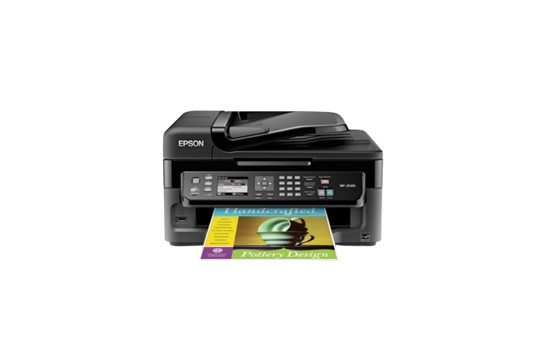
The Epson WorkForce WF-2540 is a multifunction inkjet printer that can print, scan, copy, and fax. It is designed for small offices or home offices that require a reliable and cost-effective solution for their printing needs. The printer was released in 2013 and has since become a popular choice for people who want an affordable, all-in-one printer that can handle a variety of tasks. One of the main selling points of the WF-2540 is its compact size. Measuring just 15.4 x 14.8 x 8.7 inches and weighing 12.8 pounds, it can easily fit on a desk or shelf without taking up too much space. Despite its small size, the printer has a 30-page automatic document feeder and a 100-sheet paper capacity, making it suitable for moderate printing demands.
The WF-2540 uses four individual ink cartridges, which helps to reduce ink waste and save money in the long run. The cartridges can be replaced individually, so you don’t have to replace the entire set if one color runs out. The printer uses Epson’s DURABrite Ultra Ink, which is resistant to smudging, fading, and water damage. This means that documents and photos printed with the WF-2540 are durable and long-lasting. In terms of printing speed, the WF-2540 is capable of printing up to 9 pages per minute (ppm) in black and white and 4.7 ppm in color. While this is not the fastest printer on the market, it is adequate for most small office or home office needs. The printer can also produce high-quality prints with a resolution of up to 5760 x 1440 optimized dpi.
The WF-2540 also has a number of convenient features that make it easy to use. It has a 2.5-inch color LCD screen that allows you to navigate menus and preview documents before printing. It also has built-in Wi-Fi, which means you can print from your computer, smartphone, or tablet without having to connect directly to the printer. You can also print directly from a USB drive or memory card using the printer’s built-in card slot.
In addition to its printing capabilities, the WF-2540 can also scan, copy, and fax. The scanner has a resolution of up to 2400 dpi, which means you can produce high-quality digital copies of documents and photos. The copier can make up to 99 copies at once and has options for reducing or enlarging the size of the document. The fax machine can store up to 180 pages in memory and has a speed dial function for frequently used numbers. You can use Epson WF-3520 as an alternative.
Overall, the Epson WorkForce WF-2540 is a versatile and reliable printer that is well-suited for small offices or home offices. Its compact size, individual ink cartridges, and high-quality printing capabilities make it a cost-effective choice for those who need to print, scan, copy, or fax documents on a regular basis.
Epson WorkForce WF-2540 Driver Download
Drivers and Utilities Combo Package (Windows) – Download
Printer Driver v1.54.01 (Windows) – Download
Scanner Driver and EPSON Scan Utility v3.7.9.2 (Windows) – Download
Printer Driver v12.62 (macOS) – Download
ICA Scanner Driver v5.8.12 for Image Capture (macOS) – Download